
Sign Up and Login at LevelUp Casino Australia
 Available in AU
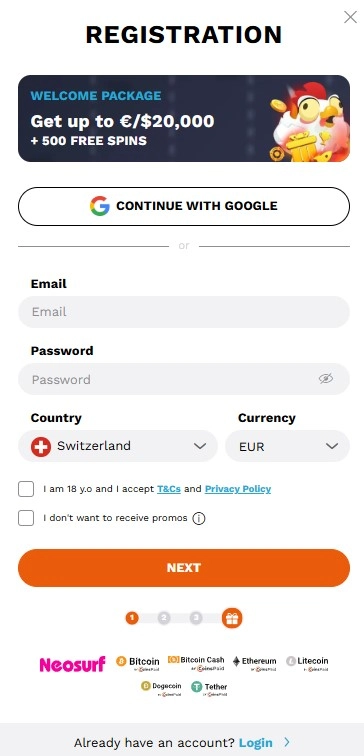
Short answer: the current LevelUp sign-up panel shows a Google option plus a standard form with email, password, Country and Currency controls, followed by age and terms acceptance and marketing-preference controls. Australian users should treat the country and currency selectors as settings to verify, not assume: AUD support is independently verified, but the live form capture does not prove an Australia-specific default. Account creation and identity verification are separate stages, and KYC can become part of the account or withdrawal process.
Start from the verified brand domain, levelupcasino.com, and use the site’s own Sign up or Login control. If access is restricted by a provider, network or regulator, this guide does not recommend VPNs, proxies or any other bypass method. Registration access is also not the same thing as Australian legal authorisation; the separate licence and trust guide covers that distinction.
LevelUp Sign Up Steps and AUD Account Setup
The current official LevelUp registration form shows the first registration panel. The visible controls were:
- a Google sign-up option;
- an email field;
- a password field;
- a Country control;
- a Currency control;
- an age and Terms and Conditions/Privacy Policy acceptance control;
- separate controls for marketing preferences.
That list is limited to what was visible on the current first-step form. It does not invent later screens, extra profile questions, phone verification or a particular country-list outcome. The useful takeaway is that country and currency are explicit account-setup choices, so they deserve attention before you fund the account.
The official page also exposes Login and Sign up at the top level. A current password-reset control was not visible in the captured page, so this guide does not publish a reset sequence that has not been verified.
LevelUp sign-up sequence for Australian users
The safest registration process is short and deliberate. The aim is not to race through the form, but to make sure the account data, currency and source site are correct before any payment is attempted.
- Verify the domain. Open levelupcasino.com directly or reach it from a trusted bookmark you created yourself. Avoid look-alike domains and search ads that use the brand name without matching the verified domain.
- Open Sign up. The current page presents Sign up as a primary account action. Use the form or the Google option shown by the site rather than relying on a third-party registration link.
- Complete only the fields actually shown. The current first step includes email, password, Country and Currency. Do not use a guide that tells you to enter fields that the live form does not request.
- Check Country and Currency carefully. The presence of these selectors matters. AUD support is verified for Australian users, but this guide does not claim that the form automatically selects Australia or AUD. Confirm what your own session shows before continuing.
- Read the acceptance controls. The current form includes age and terms acceptance. Open the terms and privacy information if you need to understand what you are agreeing to before account creation.
- Review marketing preferences. The sign-up panel includes promotional preference controls. Set them intentionally rather than clicking through without reading them.
- Complete any later verification when requested. LevelUp uses KYC as part of account and withdrawal checks. The exact verification requirements belong in the LevelUp KYC because they are more sensitive to change.
AUD setup: what is verified and what is not
Current verified LevelUp information confirms AUD support for Australian users. That is useful because account currency can affect how balances and cashier amounts are presented. It does not justify assuming that every new session starts in AUD or that the registration form always detects Australia correctly.
The current registration panel includes both Country and Currency controls, so the practical check is simple: inspect those values before completing sign-up and again before the first deposit. If your account presents a currency you did not intend to use, resolve that before funding rather than assuming it can be changed later without consequences.
For the cashier side, use the dedicated AUD and payment setup. It covers the verified payment categories and Australia-relevant methods without turning the registration page into a duplicate banking article.
Registration is not the same as KYC
Account creation establishes access credentials and basic account settings. KYC is the identity-verification layer used as part of account or withdrawal checks. Keeping those stages separate is important because a successful sign-up does not mean that every later withdrawal request will proceed without verification.
The LevelUp KYC fact is verified, but the exact document checklist and verification time are residual high-risk details. The current official AML/verification page did not provide a readable requirements list, so this registration page does not repeat third-party document lists as if they were current official rules.
Before you make a payment, use your real and consistent account details. If a later verification request arrives, matching account and payment information is easier to reconcile than details entered differently across registration, cashier and support interactions. For preparation and evidence handling, use the verification guide.
How to approach LevelUp login
The official LevelUp page currently exposes a Login control alongside Sign up. The safest route is to return to the verified brand domain and open that control from the site itself. This avoids giving credentials to a page that only resembles the casino.
Keep the email or sign-in identity used at registration consistent. If you used the Google route, remember that the account relationship can differ from a conventional email/password flow. If you used the visible email and password route, store the password securely rather than reusing one from another service.
This page does not publish a password-reset sequence because a current reset control or reset workflow was not visible in the official page capture. If you cannot access the account, use the support route available from the current site rather than following an unverified recovery link from a forum or search result.
Mobile sign-up uses the same verification logic
LevelUp works in a mobile browser, so registration does not need to depend on a native app. The important checks remain the same: correct official domain, correct account details, correct country/currency selection and deliberate acceptance of the terms shown in your session.
A smaller screen can hide context that is obvious on desktop. Before submitting, scroll through the whole form and make sure you have seen the Country, Currency, age/terms and marketing controls. The mobile sign-up explains the currently verified mobile route and why same-name app-store results should not be treated as official without provenance.
Safe access and Australian context
Two questions must stay separate. First, can you reach a current LevelUp page and see an account form? Second, what Australian regulatory context applies to the service? A working sign-up screen answers only the first question.
Registration success, a country selector and AUD support answer account-setup questions, not the separate regulatory question. Likewise, if your network or ISP blocks access, this guide will not provide instructions for defeating that control. Use the trust guide for the licence and ACMA context, then make your own decision from that information.
Official-domain verification is especially important around registration because account credentials are valuable. A page that copies the LevelUp name, colours or logo is not enough. Check the domain before entering a password, and do not reuse credentials that protect email, banking or other sensitive accounts.
Before the first deposit: four account checks
Registration is easiest to correct before money enters the account. Once you have completed the visible sign-up step, take a minute to review the account from the perspective of a future withdrawal rather than only the first game session.
- Confirm the displayed account currency. If you intend to use AUD, verify that the account and cashier present the currency you expect before choosing a payment method.
- Check your contact identity. Make sure you can still access the email or sign-in method attached to the account, since account notices and support follow-up depend on a working contact route.
- Look for verification status. You do not need to guess a document list, but you should know where the account shows KYC or verification requests so one does not surprise you during a withdrawal.
- Review the payment method in its own context. Deposit support, withdrawal support and account currency are separate decisions. The cashier should confirm the method actually available in your session.
This small review also creates a cleaner support trail if anything later goes wrong. It is easier to explain an account issue when you know which sign-in route, currency setting and payment method you used from the start.
Registration mistakes worth avoiding
- Assuming the visible default is your intended currency
- The form includes a Currency control. Check it rather than treating a preselected value as a recommendation.
- Using inconsistent personal details
- Verification is part of the account/withdrawal process, so inconsistent information creates avoidable friction later.
- Following a bypass tutorial
- If access is restricted, do not use this guide as a route around network, ISP or regulatory controls.
- Using an unofficial login page
- Begin from the verified LevelUp domain instead of relying on a copied search result, social post or unsolicited message.
- Treating sign-up as the final compliance step
- Registration and KYC are separate. A created account can still face identity checks before or during withdrawal processing.
Bottom line
The current LevelUp registration form is concrete enough to describe without guesswork: it exposes Google sign-up, email, password, Country and Currency controls, age/terms acceptance and marketing preferences. For Australians, the key practical step is to confirm country and currency yourself. AUD support is verified, but this guide does not claim an Australia-specific default that the live capture did not establish.
Use the official domain, keep registration details consistent, separate account creation from KYC and avoid any advice that tries to bypass access controls. Then use the KYC guide for verification preparation, the payments guide for cashier setup and the trust guide for the Australian regulatory picture.
For the broader brand context, see the LevelUp Australia review.
Sign Up and Login at LevelUp Casino Australia
Content created by the «Levelupcasinotipsau.com» team